Create a Spring Boot App with Mongodb + Outbox Pattern
Avoid losing messages when your Apache Kafka server goes offline
Recently I have been reading about the outbox pattern which is very useful for distributed systems, so in this tutorial we are going to see a POC of how we can implement it in a springboot service that uses mongodb.
Tools used in this tutorial:
- macOs 26.5.2
- openjdk 21.0.10
- Spring Boot 4.0.0.
- mongod v8.0.26
- debezium 3.6
- Apache Kafka 4.3.1
- podman version 5.8.1
- Docker Compose version 5.3.1
- jq-1.8.1
Lets first start by giving an overview of what it is the outbox pattern, this pattern is basically a way to protect or make your event/messages delivery to a broker reliable.
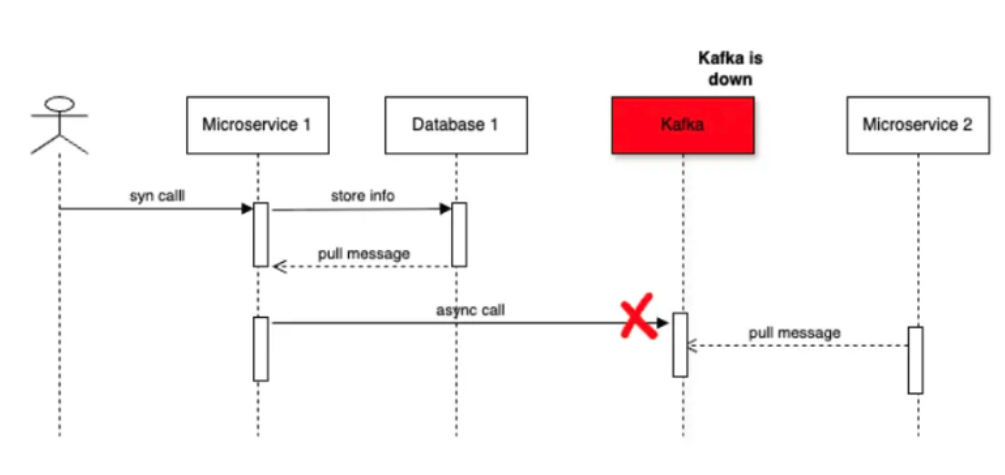
Imagine that you have a situation in which you have 2 microservices to complete a user request and the communication between these 2 systems is through apache kafka so lets say that your first microservice finish its part and needs to send the event/message to Apache kafka in order the microservice 2 consumes that message, but for some reason apache kafka is down so here we have a problem the user request was not fully processed because never reached microservice 2. Here is an image for easier view:
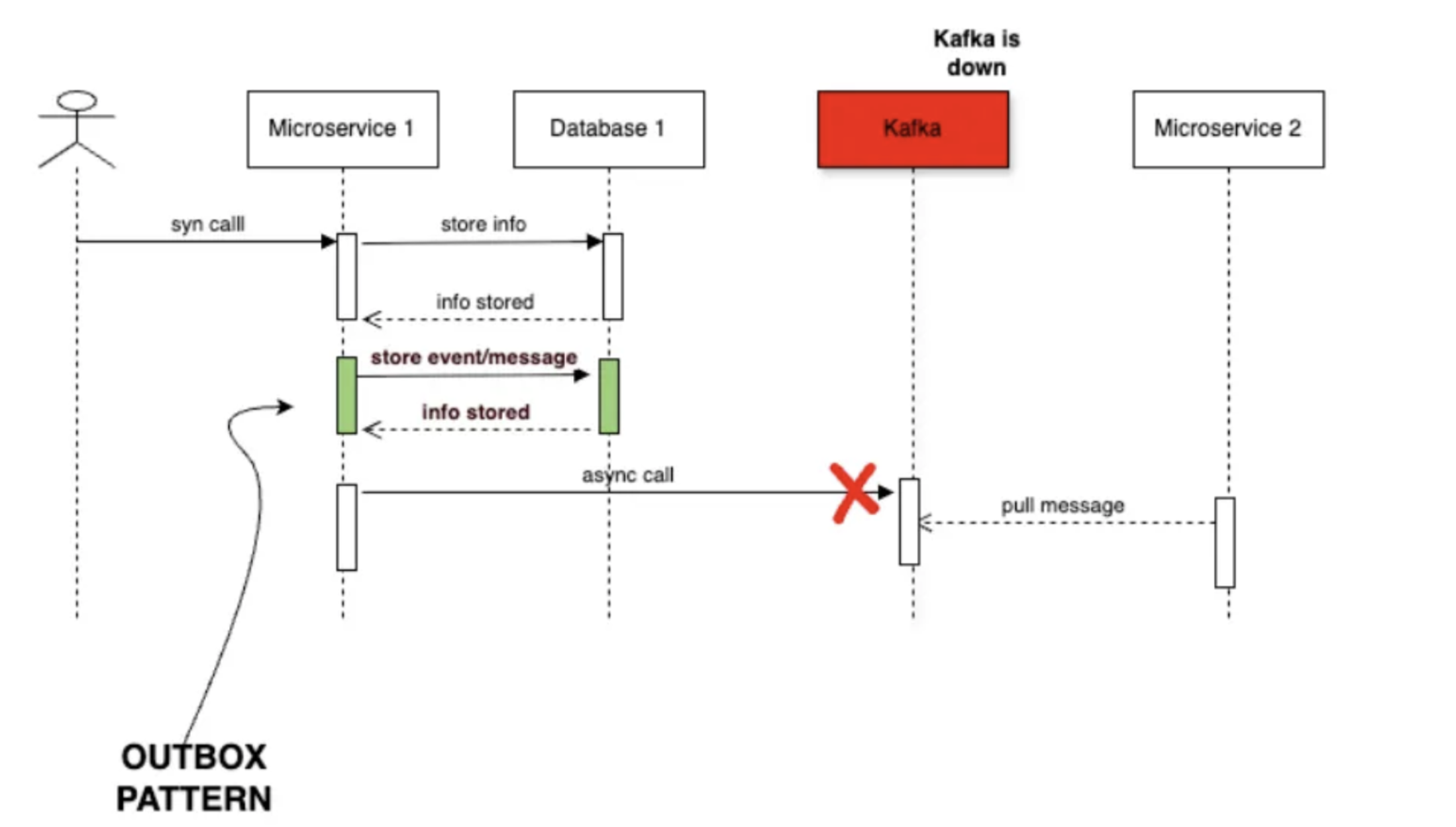
So here is where we can apply the outbox pattern which will look something like this:
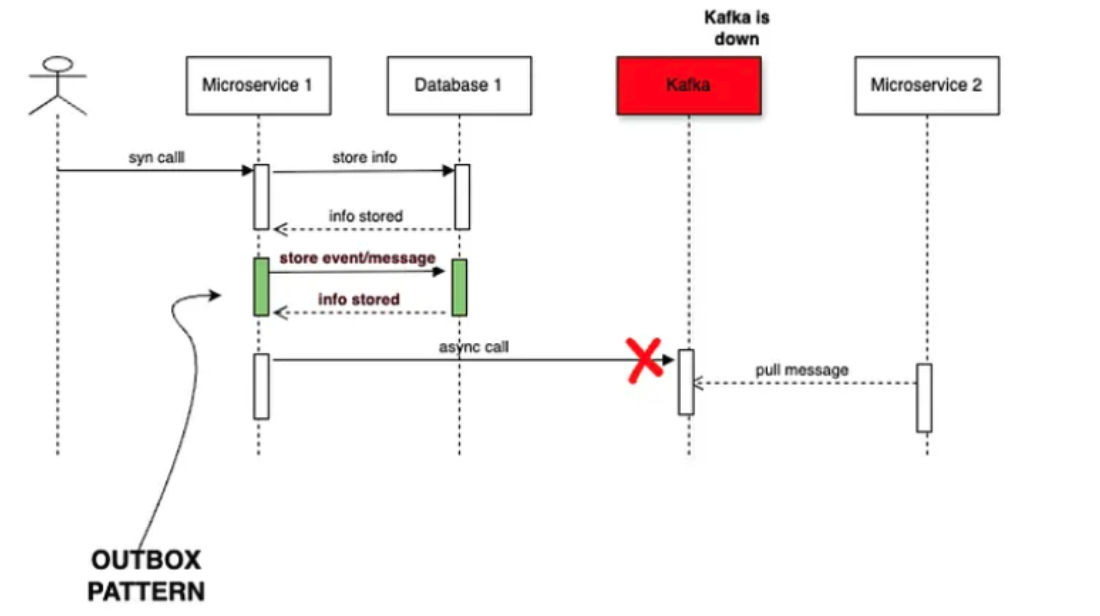
Here we can see that we have an additional step in which we first store the message that we are planning to send to kafka, with this action we can recover the message in case that the broker is down, now for the part of how to send the message in this kind of situation in this tutorial we are going to use debezium connector which basically is going to do that part for us.
Here is the high level view of this POC
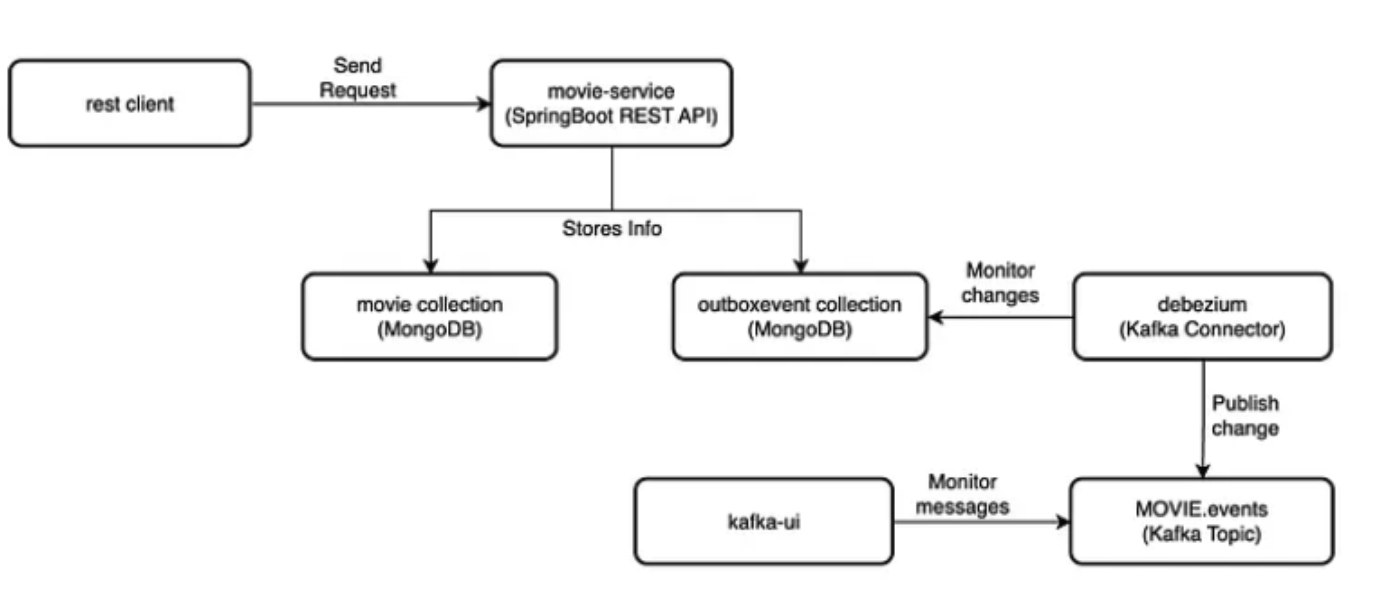
In this example as you can see in the image we will be using the movie service which expose 1 endpoint to create a new movie, this endpoint is the one that we need to see the outbox pattern in action, the idea is that we are going to create a new movie and in addition to that the service will store the event info in the outboxevent collection and debezium will detect that change and will send the message to the kafka topic and finally we should be able to see the message in the kafka-ui.
Now that we have the whole background we can start the services by running this podman command:
podman compose up --build -d spring-boot-mongodb-movies-service
(Just make sure that podman machine memory is set around 8GB if not podman is going to have problems runnig all the services at the same time)
Here is the the complete code:
https://github.com/mpedroza-mx/spring-boot-examples-pb/tree/main/spring-boot-search-platform-example
It would take some time because we are using some heavy tools such as mongodb and kafka and also consider that we are doing a data import to create the movie database, we are using the sample data from here:
https://www.mongodb.com/docs/manual/sample-data/load-sample-data-local/
Once that the services are up and running, open a terminal and execute the following command:
curl -X POST -H "Accept:application/json" -H "Content-Type:application/json" http://localhost:7070/api/movies -d @./spring-boot-mongodb-movies-service/requests/create-movie-request-payload.json | jq .
Now go to this url:
this should load the kafka-ui go to topics from the local cluster and you should see the Movies.event and then click on the Messages tab.
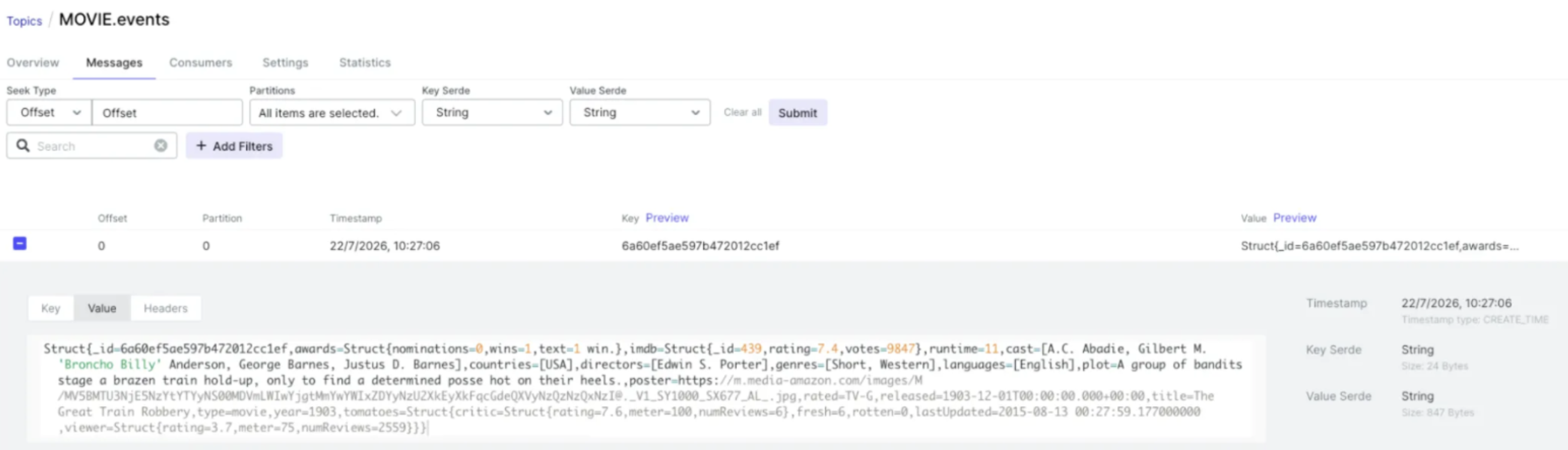
How did all this happen?
Let’s review the important parts of every piece here:
Mongodb:
- We need to initialize the replicaset, we need this because debezium relies on operation log from mongodb.
- We need to create a user with the correct permission so debezium can monitor the collection.
- We need to import the sample data.
- You can find these steps in the following file:
spring-boot-search-platform-example/spring-boot-mongo-movies-services/mongodb/entrypoint.sh file.
connect:
- This service is the one in charge of monitoring the changes in mongodb and here you need to specify the collection that you want to monitor, you can find that info here:
spring-boot-search-platform-example/debezium-connector
- The previous configuration you can add them through an http request, here you can see how do we add those configurations:
spring-boot-search-platform-example/docker-compose.yaml in the connect-init service
spring-boot-mongodb-movies-service:
- Here the important part is this class:
spring-boot-search-platform-example/spring-boot-mongodb-movies-service/src/main/java/org/learning/spring/spring_boot_mongodb_movies_service/service/MovieService.java
Specifically this part method: createMovie, because here is where we store the event/message info in the outboxevent collection
kafka-ui:
- As you can see this is only just for verification purposes, it is not needed for the outbox pattern.
spring-boot-search-platform-example/docker-compose.yaml n the kafka-ui service
And that is all I hope this is helpful for your use case.
This article is part of a main article which is this one:
Building a Modern Search Platform Using Spring Boot + MongoDB + Apache Kafka and Apache Solr
Note: The configurations shown in this example are intended for learning and local development, not for production environments.
About the author
- Senior Java Backend Engineer sharing practical insights on distributed systems and emerging technologies
Comments
Join the discussionNo comments yet. Be the first to comment.